Thursday, December 21, 2006

7th Meeting (Week 7)

Date: 20 December 2006
Time: 10:30pm

Reason and Purpose of Meeting
One of our classmate saw our application and he comment that our whole application is too simple becasue there aren't much interactivities. His comment really struck our confidence in our own work. We at the beginning was very proud and satisfied with our own final outcome, but this is the only comment that he gave after he saw our work.

Discussion
So in order to add more interactivity, we held another emergency meeting. We don't have much time left as the submission is on tomorrow. We came out with these ideas:
1) Add television in Chinese New Year scene. After click on it, there will be a list of Chinese New Year songs MTV which allowed users to choose.
2) Add speaker in Wedding scene. After click on it, users are able to choose some love songs.
3) Add a radio in Birthday scene. After click on the the radio, users can choose other birthday songs.

- We think that the 1st idea is the most relevant one. However, it is impossible for us to search for those Chinese New Year songs MTV at this place within this 12 hours.
- It is kinda weird to add a speaker in the Wedding scene...
- Play birthday songs during Birthday party, it may works in someway.

Decision
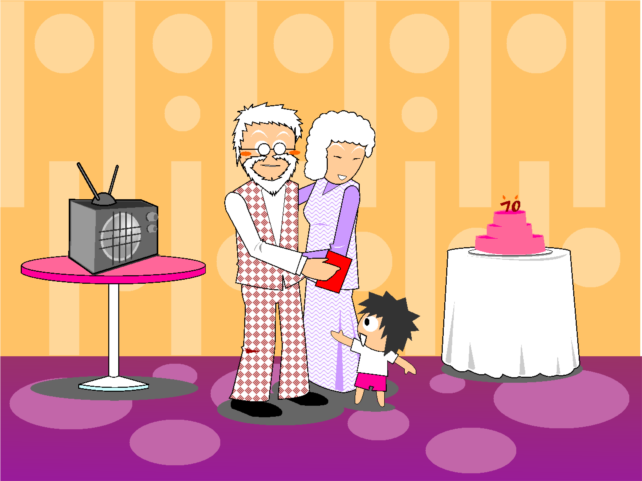
We finally decided to add radio in the Birthday scene.

Actions Taken
- We started to search for birthday songs through Internet. Our target is birthday songs in different genres and languages.
- Draw radio and table using Macromedia Freehand.
- Edit the application in Macromedia Director.

Final Outcome
here is the images of the Birthday scene.
Top: Before edit
Bottom: After edit


Tool Used in Macromedia Director (Week 7)

BEHAVIOURS

1)Library>3D>Actions>Automatic Model Rotation
- Used on 3D text "Ang Pao" as the title in Introduction.

2)Library>Animation>Automatic>Fade In Out
- Mostly used on Backbround images when they appear.

3)Library>Animation>Automatic>Rotate Continuously
- Used on the big flower in the Developers page so that it rotates continuously and shows our names and group.

4)Library>Animation>Automatic>Rotation(frame-based)
- Used on ang pao and flower in Introduction, to show some animation.

5)Library>Animation>Interactive>Rollover Member Change
- Used on all images and buttons that can be clicked.

6)Library>Animation>Interactive>Turn Towards Mouse
- Used on the eyes of the little in the Developers page.

7)Library>Animation>Sprite Transition>Soft Edge Wipe
- used on the explaination boxes for the images.

8)Library>Media>Sound>Play Sound
- used on the buttons which used to play the background music.

9)Library>Media>Sound>Pause Sound
- used on the buttons which used to pause the background music.

10)Library>Media>Sound>Stop Sound
- used on the buttons which used to stop the background music.

11)Library>Media>Sound>Channel Volume Slider
- used on the volume slider.

12)Library>Navigation>Go Next Button
- used on the next button so that after clicked, it will go to the next marker.

13)Library>Navigation>Go Previous Button
- used on the previous button so that after clicked, it will go to the previous marker.

14)Library>Navigation>Go to Frame X Button
- used on buttons so that after clicked, it will go to the particular frame.

15)Library>Navigation>Hold on Current Frame
- used on behaviour channel so that the application will wait on current frame before any action is taken.

16)Library>Navigation>Loop for X Seconds
- put on the behaviour channel so that the application will continue looping on the current frame before any action is taken.


TOOLS

1)Arrow
- Used to select and move the sprites on stage, drag and drop cast members into score, and so on.

2)Hand
- Used to move the stage. After using Hand tool, we used View>Standard View so that we are able to view the whole stage in the standard size again.

3)Magnifying Glass
- Used to zoom in the stage when there is small image that is hard to drag to a particular place.

4)Rectangle
- Used this tool to draw a rectagle on stage to measure the distance of objects so that the alignment is correct. the rectangle is deleted afterwards.


WINDOWS

1)Text Window
- Typed in the window and after that change the display of the text to 3D text so that it can be animated.

2)Movie Window
- used to change the size and background color of the movie.

3)Behaviour Window
- after selected a sprite member, the Behaviour Window will appear under Property Inspector.

We can see what behaviours the sprite has, and also change the setting of the behaviour.

4)3D Extruder
- Used to change some simple setting of the 3D members created in Director.

5)behaviour Inspector
- Used to create some simple behaviours that is not found in the Library. After added the new Behaviour, we have to add the Event and Action to the Behaviour.

Monday, December 18, 2006

Audio (week 7)

Although we have to draw the all the images first, but at week 6 we have been started to search the music and songs for the assignment. Among the songs, some are we ask from friend, some are from our own CD and others are downloaded through website.

At the beginning, we use Nero to edit the songs. Maybe is because we install the software wrongly, after we completed editing, it is not allowed us to save the songs (the Nero software still can be used, it only not allowed us to save the song). We spent a lot of time to try to find out the problem, but we didn’t get any accomplishment, until now we still what’s going on with the software.

After that, we decided to use Sony Sound Forge to edit the songs. It is a very interesting software because we can change the rate of the song. It will create a totally different feeling when we changed the rate. All of us are very enjoy the editing process, it is really fun. Then, some problems occurred again. As we know, MP3 file can imported into Sony Sound Forge, but some of the songs which are in MP3 file format can not imported into the software. In addition, some songs can not be saved after editing. It makes the process of editing become harder.

There are some same problems we faced when used both of these software like both of them don’t support all the file format, so that we have to find others songs to replace the songs which we want used in the assignment. In this process, we faces a lot of frustrate, but we all have the same opinion- editing sound is very interesting.

Thursday, December 14, 2006

The GUI and Buttons(week 6)

Here are the Buttons and GUI of our application. Some of the Buttons rollover are included.

Friday, December 08, 2006

5th Meeting (week 5)

Date: 7 Dec 2006
Time: 11:30pm
Duration: 2 hours

We hold a meeting after the submission of assignment 1 of multimedia authoring to decide who’s “introduction” will be choose and used for our assignment 2. After we saw each other’s “introduction”, we decided to choose jun’s design, because we all think that her design is more accommodate with assignment 2’s style. But there will be some changes or editing of her design.